Live Publish Settings
Live publishing puts your timing online so anyone, anywhere can follow along — not just people at the track. Laps appear on the web as they happen, on the same site that keeps your results afterwards.
Local web vs. live publish
Web Interface shows timing to people on the same network as the timing PC. Live Publish puts it out on the internet for everyone. You can use either, both, or neither.
Turning it on
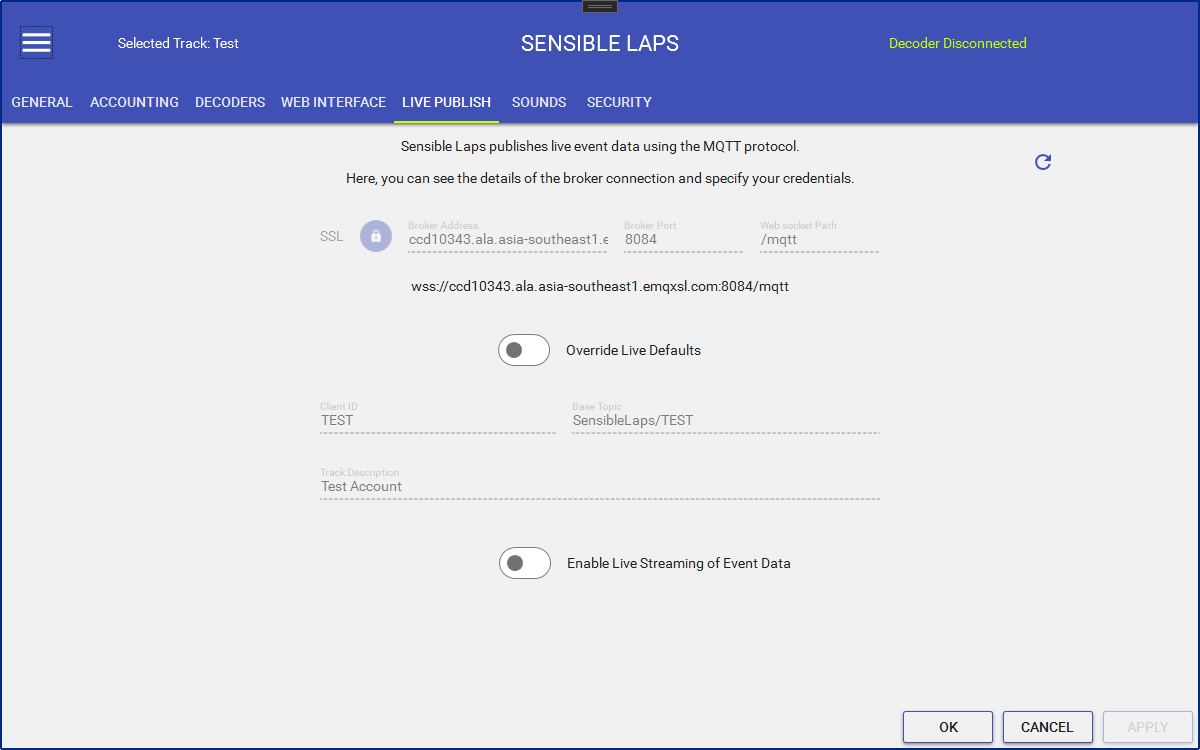
Everything is already set up for you — there's nothing to fill in. Just switch on Enable Live Streaming of Event Data and your timing goes live.
Live publishing needs a valid license. Without one, the switch stays locked.
The connection boxes
The boxes near the top show how Sensible Laps connects. They're filled in for you and there's normally no reason to touch them. If they ever look wrong, press Refresh to load them again.
Using your own setup
Most clubs never need this. If you'd rather run your own live timing instead of the Sensible Laps one, switch on Override Live Defaults. That lets you type in your own Client ID, Base Topic and Track Description. Leave it off to keep the standard setup.
Status icon
When live publishing is running, a publishing icon appears in the top bar:

If something goes wrong with the connection, the icon changes colour — a quick glance tells you whether people online can still see your timing.