Control Panel
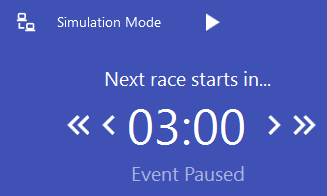
Once an event is loaded, the Control Panel appears at the top right of Sensible Laps. It's how you drive the meeting through its schedule.
 The play button starts the loaded event — the
first un-run delay in the schedule begins.
The play button starts the loaded event — the
first un-run delay in the schedule begins.
While a delay counts down, you can pause it, or nudge it forward and back in small and large increments (set in General Settings).

When paused, Event Paused is shown. Click play to resume.
When a race is running you can stop or restart it. Restarting also restarts the pre-race delay.

Finishing a race
When the race time is up but some drivers can't finish, Sensible Laps waits two minutes, then automatically stops and completes the race. If every running driver has already finished, just hit stop to move into the next delay.